
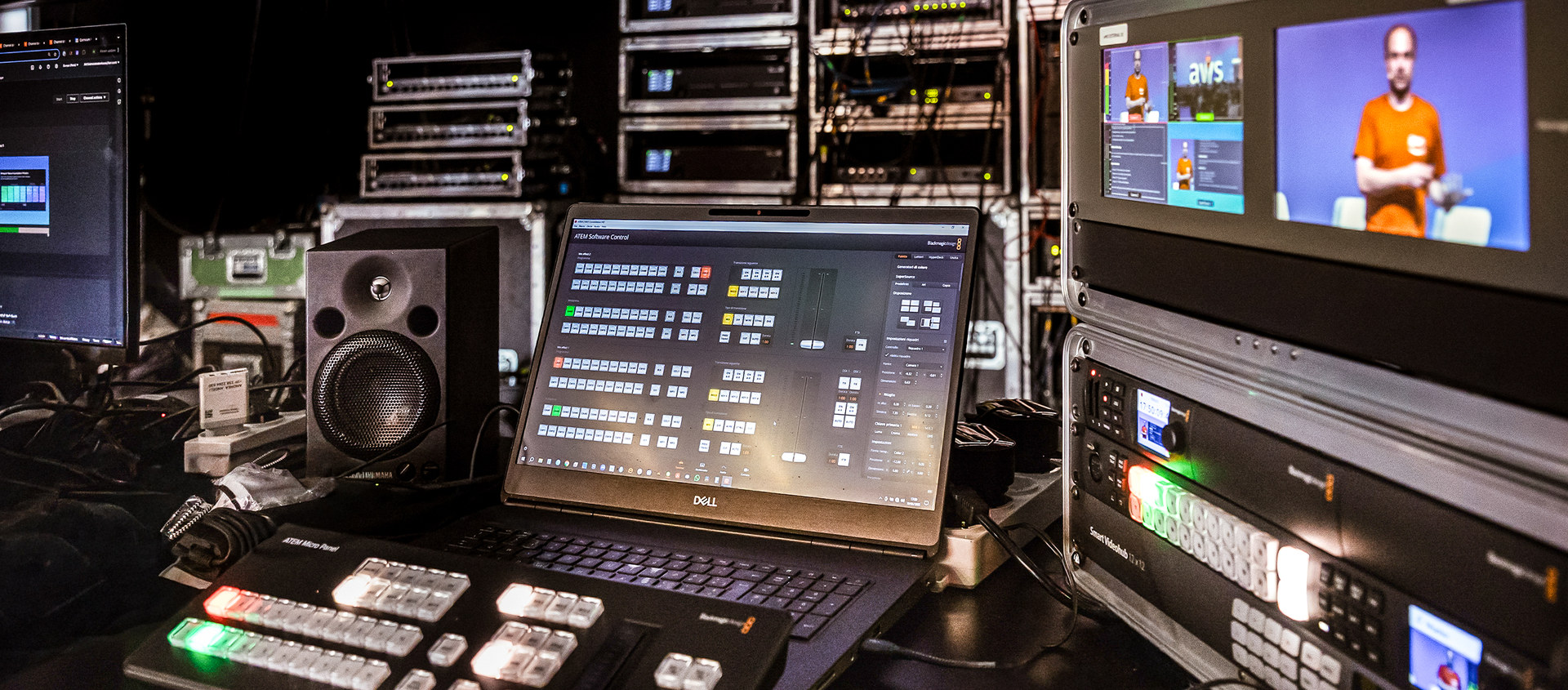
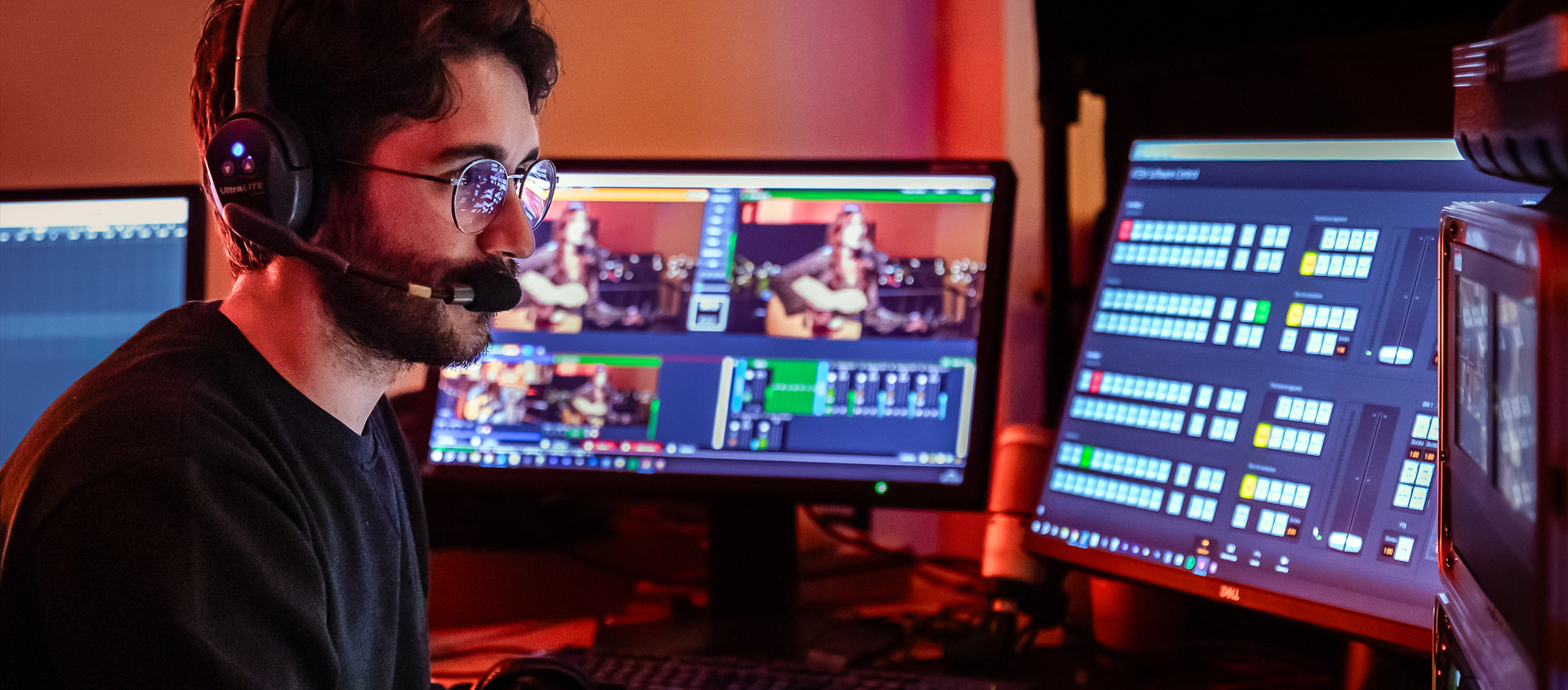
WinISORecorder is the ISO recorder I am building for my own control room. It records every camera to its own file, all with the same timecode, and when the show ends it hands over an edit that is already done: in DaVinci Resolve a multicam clip and a timeline with the same cuts and dissolves that went to air, and for Adobe Premiere Pro an XML and an EDL with the same sequence. The timecode comes from the switcher, which embeds it in the SDI signal of every output, and the cuts are read from the Blackmagic ATEM 2 M/E Constellation HD over the network as they happen. That is why the timeline is not a reconstruction but a copy of the live show, ready to be fixed. While recording I drop markers from the keyboard or from a Bitfocus Companion button and find them on the timeline later, and if there is a Blackmagic HyperDeck in the control room it starts and stops together with the tracks. It is written in C++ on the Blackmagic DeckLink SDK and runs on Windows, on an ordinary production computer: on first launch it measures the machine and tells you how many cameras it can record and at what quality. It records HD 1080p25 and, experimentally, UHD 2160p25. You add tracks one by one up to that limit, and every configuration can be saved under a name. Before every recording it checks that disk and CPU can keep up. I am testing it on the control room I work with, a Blackmagic ATEM 2 M/E Constellation HD with two Blackmagic DeckLink Duo 2 cards and a Blackmagic DeckLink Quad HDMI Recorder, where it has recorded ten tracks at once for a full hour without dropping a frame. The test version can be downloaded from this page, with a user manual in English. The final version will come once it has passed real-world testing.
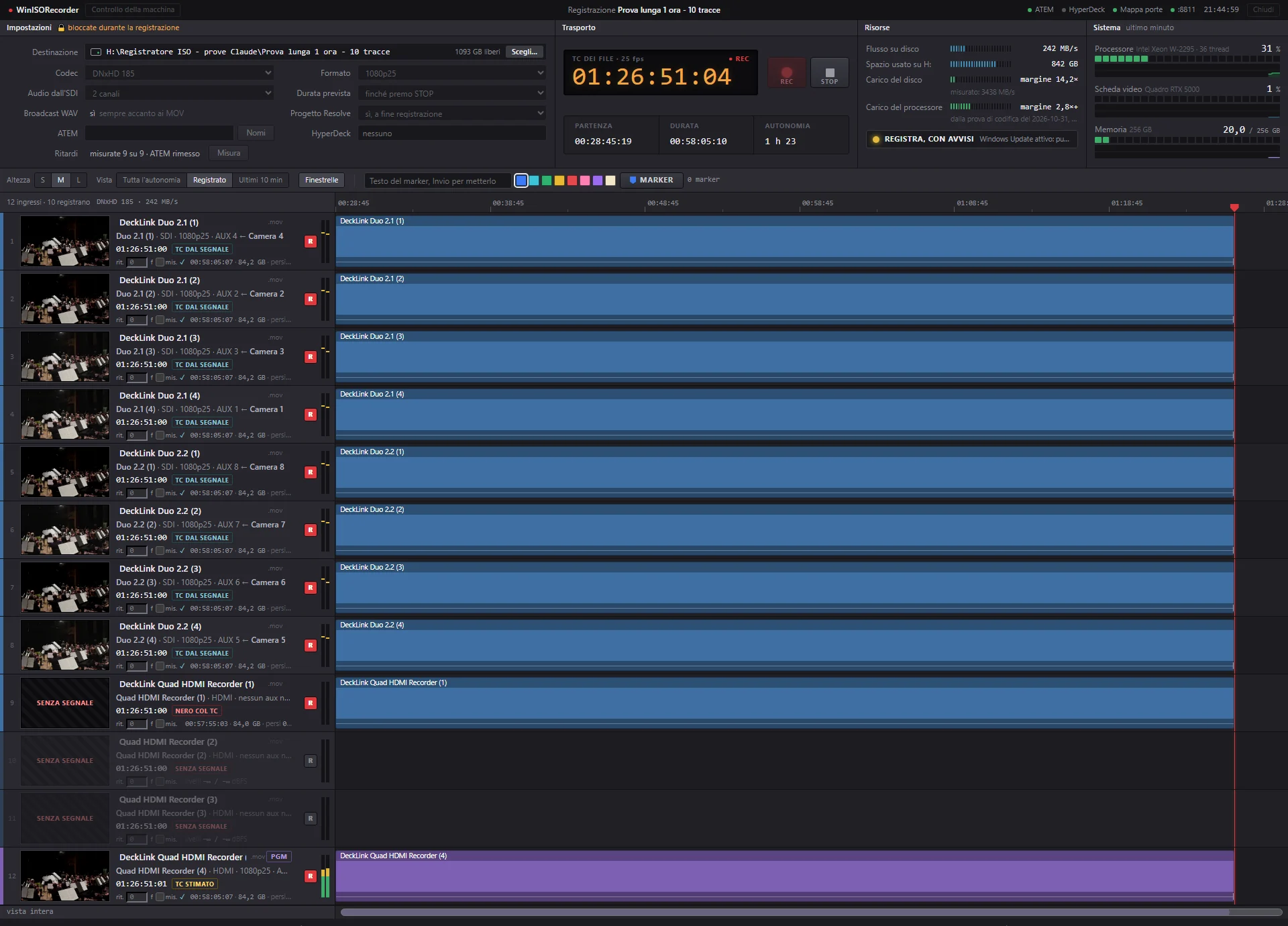
WinISORecorder at minute 58 of the one-hour test: ten tracks recording, nine with signal and one left empty on purpose.
Why a software ISO recorder
After a multicam live show the same request almost always follows: a version edited with more care, a clip to publish, a cut to fix. But there is only one programme recording, and to rework it you need the individual cameras. If each one was recorded on its own you have to sync them by hand and redo every cut while watching the programme recording, and that is a long job to start over every time.
Hardware ISO recorders solve the problem, but they are expensive and have a fixed number of inputs. The Blackmagic DeckLink cards were already in my control-room computer. What was missing was a program that recorded every input with the switcher timecode and remembered what had gone to air.
1
Blackmagic ATEM 2 M/E Constellation HD
Sends each camera to an aux output. The timecode travels inside the SDI signal.
→
2
Blackmagic DeckLink cards
Bring the outputs into the computer. Every frame arrives with its audio and its timecode.
→
3
WinISORecorder
Writes one file per camera while listening to the Blackmagic ATEM 2 M/E Constellation HD on the network, which announces every cut.
→
4
DaVinci Resolve or Premiere Pro
They receive the files already in sync and the timeline cut like the live show.
ISO recording with the Blackmagic ATEM 2 M/E Constellation HD timecode
One file per camera
Every SDI or HDMI input on the Blackmagic DeckLink cards becomes a track, recorded to a MOV file: Avid DNxHD in HD 1080p25 and Avid DNxHR in UHD 2160p25. How many tracks can record at once is set by the machine, not by the program, as the card below explains. All the files start on the same frame and stop on the same frame. If a camera comes in late its track still starts with the others: it stays black until the signal arrives, but it already carries the right timecode.
The switcher timecode
The Blackmagic ATEM 2 M/E Constellation HD embeds timecode in the SDI signal of every output and the recorder copies it into every file. That is why the cameras line up by themselves in Resolve and in Premiere. HDMI inputs carry no timecode, so they take it from an SDI input.
How many tracks, and setups
The recorder opens with no tracks. I add them one by one with “Add track”, or with a single button all the inputs fed by an aux output of the Blackmagic ATEM 2 M/E Constellation HD. Which aux output reaches which input is found by the recorder itself with the “Map inputs…” button: it switches each aux output to black and then to bars for a moment, watches which input changes and puts it back. Twelve outputs in a quarter of a minute. You do it once, off air, and again only if the cabling changes. I remove a track with the × on its number, leave it out of the recording without removing it with the R button, and give it a name by hand. Next to it is the number of tracks possible, the lowest of five limits: the card inputs, the ATEM’s aux outputs, CPU and disk with a 30% margin, and the disk space for the expected duration. The program also says which of the five is holding it back. At the limit the button turns off, and if I arm more tracks than the machine can handle it says so before REC.
Every configuration can be saved as a setup with a name: tracks, file names, codec, audio and destination. So I keep one setup for the concert and one for the conference and recall them with one click.
4K, experimental
In UHD 2160p25 the recorder writes Avid DNxHR at HQ, SQ and LB quality, just as in HD it writes DNxHD 185, 120 and 36. It needs a 12G-SDI or HDMI 2.0 input. The Blackmagic DeckLink Duo 2 cards are 3G, and the recorder leaves them out by itself and says why, while the inputs of the Blackmagic DeckLink Quad HDMI Recorder accept 2160p25. A UHD track costs the CPU about four times an HD track: my workstation handles 4 with the margin, against 21 in HD. In UHD a lower quality does not give you more tracks either, because the CPU’s work is in the encoding and not in the bitrate: DNxHR LB weighs almost as much as HQ and only saves disk. 4K is experimental. I recorded it all the way to the Resolve project but without a real 4K source, because my Blackmagic ATEM 2 M/E Constellation HD does not produce one.
A preview per camera
Next to each track there is a small picture of what is coming in, so you can check before REC that every camera is in the right place. If the computer struggles the preview slows down, never the recording.
The live cuts
While recording, the program stays connected to the Blackmagic ATEM 2 M/E Constellation HD over the network and logs every cut and every dissolve. On my control room I measured that the new picture reaches the cable two frames after the network announcement: the recorder allows for this delay and puts every cut on the right frame.
Blackmagic HyperDeck
If there is a Blackmagic HyperDeck in the control room, the recorder starts and stops it together with the tracks, and its recording joins the project lined up with the others. In a one-hour test the twenty cuts fell on the same frame in the Blackmagic HyperDeck Studio Mini file and in the recorder files.
Clips from other Blackmagic HyperDeck recorders join the project too, for example decks recording cameras that don’t go through the Blackmagic DeckLink cards. I copy the clips from the media cards into a folder and point the recorder to it. For each clip it shows how much of the recording it covers and suggests which ATEM input it belongs to, from the name given to the HyperDeck. I confirm or correct, and the clips become angles of the multicam, cut by the ATEM’s cuts like the tracks. It remembers the assignments for next time. If a deck started late, the part its clip does not cover uses the program on the timeline instead of leaving a black hole. In the test with a Blackmagic HyperDeck Studio Mini, ten cuts out of ten landed on the exact frame.
The live cut in Resolve
When recording stops it builds the project with the files, the multicam clip and a timeline with the same cuts and dissolves as the live show. I open it in DaVinci Resolve and start refining straight away instead of rebuilding. After an hour on ten tracks the project was ready in six seconds. If Resolve is closed it opens it; if the project does not get built it says so, and the PROJECT button builds it again. It also writes an FCPXML, which Resolve imports even without the Studio version.
The same edit in Premiere Pro
If you edit in Adobe Premiere Pro, the same folder holds an XML and an EDL. They contain the sequence with the Blackmagic ATEM 2 M/E Constellation HD’s timecode, each camera cut where the live show cut it, the dissolves, the markers and the audio, which follows the video as it does in Resolve. In Premiere the multicam is built from the files, which already share the same timecode.
Markers
During the show I mark the moments I want to find again: applause, a mistake, the start of the second half. Markers come from the keyboard, from the recorder page or from a Bitfocus Companion button, with a note and a colour. In Resolve and in Premiere they sit on the timeline in the right place.
Audio
The audio coming in through the Blackmagic DeckLink cards goes into every file and also into a Broadcast WAV file next to it, with its own timecode. Video and audio leave the driver together and stay in sync: compared with the source clip they were 0.65 milliseconds apart, less than a sixtieth of a frame. The level meters on the page read like the audio mixer meters of the Blackmagic ATEM 2 M/E Constellation HD, and every track shows its waveform, even when the page is opened after recording has started. Audio is recorded as it arrives, untouched.
Built not to lose a frame
It knows the machine
On first launch it looks at processor, memory, disks and cards and checks the speed of every PCIe slot. On my computer it found the system disk, a 1 TB Samsung 980 PRO, running at a quarter of its speed: the kind of fault nobody would otherwise notice.
It also tests how many DNxHD encodes the CPU can handle. If it handles more than the machine has inputs, it runs the test again with more encodes until the number settles. On my computer it reports 21 tracks of DNxHD 185 with the margin. With real concert footage I recorded 40 at once without dropping a frame, but with the CPU almost full. The reported number is on the safe side on purpose, because a dark hall with cameras at high gain costs more.
Before REC
It tests the disk by writing ten files for a minute at the real data rate plus 30%, and the CPU by encoding a noisy picture like a camera with high gain. If something can’t keep up it says so before you start, not halfway through the concert. If the Blackmagic ATEM 2 M/E Constellation HD does not answer on the network it warns that the live timeline will be missing and asks whether to record anyway.
How much is left
The time line is as long as the free space on the disk, so while recording I can also see how much is left.
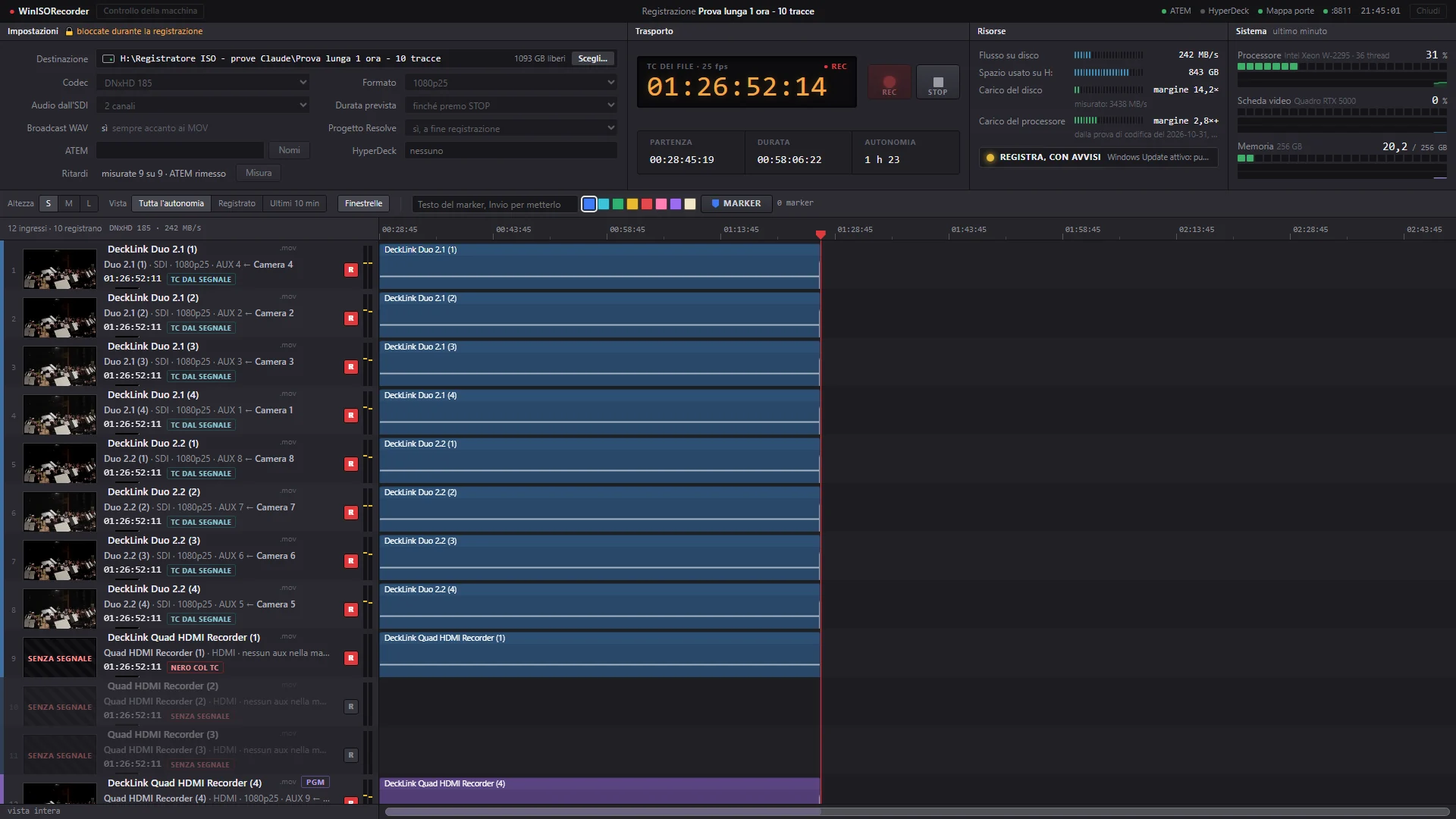
The “whole capacity” view after 58 minutes: ten tracks take 843 GB and the disk still has room for one hour and 23 minutes.
If a signal drops
The track doesn’t stop: it writes black and keeps counting timecode. I pulled the signal for eight seconds and when it came back the real timecode picked up exactly where the estimate had got to.
If everything goes down
The files stay readable even if the program is killed. When it is reopened the recorder fixes them by itself: it drops the last incomplete piece without re-encoding anything and keeps the originals aside. In the test with ten tracks killed at once, half a second was lost.
Converter delay
A signal going through a converter or another device can arrive a few frames late. The recorder measures that with one button, comparing the cuts against a reference input, and corrects it in the files. With the Blackmagic Micro Converter SDI to HDMI 3G I use to bring an SDI output into an HDMI input, the measured delay is zero.
Just one folder
It installs with a setup, without administrator rights, and carries everything it needs, encoder included. The only separate installs are Blackmagic Desktop Video, without which the cards cannot record, and DaVinci Resolve Studio for the ready-made project. If something is missing the recorder says so in a window and links to the official download page. It never downloads or installs anything by itself.
The manual
The user manual is a PDF in English with a clickable table of contents and cross-references. It opens from the Help button or with F1 and covers the recorder from installation to the Resolve project.
The test report
After a test the tester presses “Test report…”. The recorder shows all the text that will go into the report, lets you add notes and creates a small zip to email to me. Inside are the machine check, the settings, the figures of the last five recordings and the last lines of the session log, which help to understand even a program that closed by itself. There is no video, no addresses and no computer or source names, and nothing is sent automatically: the tester sends the email.

The Blackmagic ATEM 2 M/E Constellation HD in my control room, front and back: the switcher I tested the recorder on.
The control-room network
The whole control room lives on a local network of its own, the same at every event, which travels in the rack with the Blackmagic ATEM 2 M/E Constellation HD. The devices are wired and have fixed addresses, so the recorder, Bitfocus Companion and the control software always find them in the same place. Video and timecode don’t go over the network but over the SDI cables: the network carries the commands and whatever tells you what is happening in the control room.
Router and switch
A Ubiquiti EdgeRouter X and a NETGEAR GS308PP switch, mounted in the rack, wire together the Blackmagic ATEM 2 M/E Constellation HD, the Blackmagic Smart Videohub 12 x 12, the Blackmagic HyperDeck Studio Mini, the Blackmagic SmartView Duo, the Blackmagic Streaming Encoder 4K and the two production computers: the recorder workstation and a Dell Precision 7750.
The boundary with the venue
There is only one port towards the client network, the router’s. The Blackmagic devices have no password and the router keeps them apart from the venue network, which cannot reach them from outside. The stream still goes out, with no ports to open.
The Blackmagic ATEM 2 M/E Constellation HD on the network
The recorder stays connected to the Blackmagic ATEM 2 M/E Constellation HD for the whole recording and receives its cuts, dissolves and source names. At REC it reads the names again, so every file is named after the source on its output at that moment. In the one-hour test the connection never dropped: more than twenty thousand messages without a single error.
Bitfocus Companion and Elgato Stream Deck XL
Bitfocus Companion runs on the same computer as the recorder and sends markers from the Elgato Stream Deck XL with an HTTP request to its port 8811. From the same Bitfocus Companion pages I control the Blackmagic ATEM 2 M/E Constellation HD, the Blackmagic Smart Videohub 12 x 12 and the Blackmagic HyperDeck Studio Mini, so the whole control room is run from one place.
The testing tool
During testing the network was the main tool: from there I drove the Blackmagic ATEM 2 M/E Constellation HD, the Blackmagic Smart Videohub 12 x 12 and the Blackmagic HyperDeck Studio Mini to make cuts, change sources and start recordings, always off air and putting everything back as it was at the end.
Without the network
If the recording computer can’t see the Blackmagic ATEM 2 M/E Constellation HD, recording carries on with its timecode, which travels in the cable. Only the live timeline and the source names are missing, and the recorder page tells you so before REC.
Tested on a Blackmagic ATEM 2 M/E Constellation HD
I ran the tests on my own control room: a Blackmagic ATEM 2 M/E Constellation HD, two Blackmagic DeckLink Duo 2 cards, a Blackmagic DeckLink Quad HDMI Recorder and a workstation with an ASUS WS C422 SAGE/10G motherboard, an 18-core Intel Xeon W-2295 CPU, 256 GB of memory, an NVIDIA Quadro RTX 5000 graphics card and a 2 TB Samsung 980 PRO NVMe drive for the recordings. The Blackmagic ATEM 2 M/E Constellation HD’s eight aux outputs go straight into the eight SDI inputs of the two Blackmagic DeckLink Duo 2 cards, and the program also reaches an HDMI input on the Blackmagic DeckLink Quad HDMI Recorder through the Blackmagic Smart Videohub 12 x 12 and a Blackmagic Micro Converter SDI to HDMI 3G.
- One continuous hour on ten tracks of DNxHD 185 at 1080p25, with the Blackmagic HyperDeck Studio Mini playing back footage of a concert: 90,653 frames per track, none dropped and no timecode jumps.
- CPU load averaged 16.5% and never went above 28%.
- The CPU can handle more tracks than my machine has inputs: 40 copies of the same input carrying concert footage, one minute of DNxHD 185, no dropped frames and CPU load between 88% and 95%.
- With vMix running on the same computer, sending a vMix Call into the Blackmagic ATEM 2 M/E Constellation HD from a Blackmagic DeckLink Mini Monitor HD: half an hour on ten tracks without a dropped frame, CPU load averaging 15%.
- Ten tracks with audio write 242 MB per second, about 850 GB an hour. The 2 TB Samsung 980 PRO handles 3380, fourteen times as much, and halfway through the test I deleted 56 GB from the same disk without the recording noticing.
- All outputs recorded together, with ten cuts and three dissolves on the program: 14 out of 14 cuts on the right frame on all nine tracks with signal, the HDMI one included.
- The clip from a Blackmagic HyperDeck Studio Mini, copied from the media card and brought into the project as the program: ten cuts out of ten on the exact frame.
- The timecode sits on the right frame. I checked it by drawing a counter into the picture and comparing it with the timecode: 7,515 frames out of 7,515.
- The project opens in DaVinci Resolve Studio 21 with the ten-angle multicam and the cut timeline. In Premiere Pro 2026 the XML and the EDL bring in the clips, the dissolves and the audio: on the one-hour test 22 edit points out of 22 on the exact timecode.
- In UHD 2160p25 on the four inputs of the Blackmagic DeckLink Quad HDMI Recorder: 30 seconds of DNxHR HQ on four tracks, no dropped frames, and the Resolve project at 3840×2160 built at the first attempt. Without a 4K source the tracks were black, so the CPU load comes from the separate test: four tracks with the margin.
Still to come: a cable pulled mid-recording, the free version of Resolve, installation on a second computer and 4K with a real 4K Blackmagic ATEM. The test log below goes through the tests one by one.
System requirements
- Windows 10 or 11, 64-bit.
- One or more cards compatible with Blackmagic Design DeckLink, with Blackmagic Desktop Video 16 or later installed. I use two Blackmagic DeckLink Duo 2 cards and a Blackmagic DeckLink Quad HDMI Recorder. UHD 2160p25 needs 12G-SDI or HDMI 2.0 inputs.
- A Blackmagic ATEM switcher on the network, for the cuts and the camera names. Without the network you still record with timecode, which travels in the cable, but there is no live timeline.
- DaVinci Resolve Studio to get the project ready to open. Without Studio you still get the FCPXML to import into Resolve, and the XML and EDL for Premiere Pro.
- A fast disk, ideally NVMe: each DNxHD 185 track writes 23 MB per second and ten tracks with audio take about 850 GB an hour. In UHD a DNxHR HQ track writes about 91 MB per second.
- Microsoft Edge WebView2 Runtime, which Windows usually already has. Without it the recorder opens in the web browser and works the same.
Download
WinISORecorder 0.9 beta 4
- Windows 10 & 11 · 64-bit
- 59 MB setup · zip
- Manual included
- Free
The test version for beta testers can be downloaded here, with the English user manual inside the setup. It is free and comes with no warranty.
If you downloaded an earlier version, download again and install over it: settings, setups and the input map are kept.
Do not use it as the only recorder of a show that cannot be repeated: always keep another recorder running.
The setup is not signed yet, so Windows may show “Windows protected your PC”: click “More info”, then “Run anyway”.
After every test the “Test report…” button prepares a report to send to info[at]angeliandrea.it: it is what helps me most, especially when something went wrong.
SHA-256 of the setup inside the zip259639aa0fb1c198e6f71e0674a50d4ea2ec6958be5c8710bdf3df6799f692a6
Terms of use
Disclaimer. WinISORecorder is free and is provided as is, without warranty of any kind, including fitness for a particular purpose. You use it at your own risk: test it on your own system before trusting it with a live event, and always keep an independent backup recording. To the extent permitted by law, the author accepts no liability for any damage, lost recordings or lost data resulting from the use of the program or the inability to use it.
License. WinISORecorder is released under the MIT License:
MIT License
Copyright (c) 2026 Andrea Angeli
Permission is hereby granted, free of charge, to any person obtaining a copy of this software and associated documentation files (the “Software”), to deal in the Software without restriction, including without limitation the rights to use, copy, modify, merge, publish, distribute, sublicense, and/or sell copies of the Software, and to permit persons to whom the Software is furnished to do so, subject to the following conditions:
The above copyright notice and this permission notice shall be included in all copies or substantial portions of the Software.
THE SOFTWARE IS PROVIDED “AS IS”, WITHOUT WARRANTY OF ANY KIND, EXPRESS OR IMPLIED, INCLUDING BUT NOT LIMITED TO THE WARRANTIES OF MERCHANTABILITY, FITNESS FOR A PARTICULAR PURPOSE AND NONINFRINGEMENT. IN NO EVENT SHALL THE AUTHORS OR COPYRIGHT HOLDERS BE LIABLE FOR ANY CLAIM, DAMAGES OR OTHER LIABILITY, WHETHER IN AN ACTION OF CONTRACT, TORT OR OTHERWISE, ARISING FROM, OUT OF OR IN CONNECTION WITH THE SOFTWARE OR THE USE OR OTHER DEALINGS IN THE SOFTWARE.
WinISORecorder is an independent project, not affiliated with or endorsed by Blackmagic Design. ATEM, DeckLink, HyperDeck, Videohub, SmartView, Desktop Video and DaVinci Resolve are trademarks of Blackmagic Design. Avid DNxHD and Avid DNxHR are trademarks of Avid Technology. Microsoft, Windows and WebView2 are trademarks of the Microsoft group of companies. Intel and Xeon are trademarks of Intel Corporation. Samsung is a trademark of Samsung Electronics. Adobe and Premiere Pro are trademarks of Adobe. vMix is a trademark of StudioCoast Pty Ltd. Ubiquiti and EdgeRouter are trademarks of Ubiquiti Inc. NETGEAR is a trademark of NETGEAR, Inc. ASUS is a trademark of ASUSTeK Computer Inc. NVIDIA and Quadro are trademarks of NVIDIA Corporation. Dell and Precision are trademarks of Dell Inc. Elgato and Stream Deck are trademarks of Corsair. Bitfocus Companion is software by Bitfocus AS.
Test log
I log the tests here as I run them, newest first. Every test is done off air on my own control room, and at the end the Blackmagic ATEM 2 M/E Constellation HD, the Blackmagic Smart Videohub 12 x 12 and the Blackmagic HyperDeck Studio Mini go back to how they were. I also write down what went wrong and how I fixed it, because that says more than anything else about how far you can trust it.
17 November 2026, night — The input map from the recorder
What I tested. Looking at the input menu I realised that on another control room every line would have said “not in the input map”. Which aux output of the Blackmagic ATEM 2 M/E Constellation HD reaches which input could only be found from the command line, so a tester who had just installed it had no map. The recorder now has a “Map inputs…” button, and I tested it on my control room.
How it went. Twelve aux outputs tested in 13-15 seconds. The eight inputs of the two Blackmagic DeckLink Duo 2 cards came back linked to the same outputs as before, and at the end the ATEM, read again from scratch, had every output as it was. The input menu updated by itself.
What I fixed. The program’s HDMI input had no signal at that moment, and the first map took its output away. An input without signal now keeps the output from the previous map, as long as no other input has taken it.
17 November 2026, evening — The beta tester version and 4K
What I tested. The first version to be installed on computers other than mine, for a group of beta testers, and the UHD 2160p25 format.
How it went.
- The setup installs without administrator rights, upgrades over the previous version and uninstalls cleanly. I tested all three cases, and the installed files were identical to the program’s.
- On first launch the recorder shows a test-version notice. If Blackmagic Desktop Video or Microsoft Edge WebView2 is missing it says so and links to the official download page.
- The user manual in English, 19 pages with a clickable table of contents and cross-references, opens from the Help button and with F1.
- The test report: preview on the page, zip created, email prepared. I read it line by line and it held no addresses, no computer name and no source names.
- 4K: 30 seconds of DNxHR HQ on four tracks of the Blackmagic DeckLink Quad HDMI Recorder, 712 frames per track, none dropped. At STOP Resolve was closed: the recorder opened it and the 3840×2160 project was built at the first attempt. The Blackmagic DeckLink Duo 2 cards left themselves out, saying that 12G-SDI or HDMI 2.0 inputs are needed.
What I fixed.
- Resolve, when opened by the recorder, sometimes started without the service that receives commands. I found out why: it starts that service about 30 seconds after its window, and querying it earlier brings it down. The recorder now reads Resolve’s log and waits until the service is ready. In the 4K test it worked at the first attempt.
- When the project failed, the script window stayed open waiting for a key, forever. It now closes by itself after a minute.
- An input that does not accept the chosen format said “input in use?” and sent you looking for another program. It now says that UHD needs a 12G-SDI or HDMI 2.0 input.
- If the recorder closed by itself, nothing was left to say why. Every session now writes a log, and its last lines go into the test report.
- The first setup also carried the lab tools. It now installs only the program’s own, and upgrading removes the old ones.
What I decided. 1080i50 is no longer among the formats: 1080p25 and 2160p25 remain, with three qualities each. Recordings made earlier in 1080i50 still open and repair as before.
What I learned. In UHD, DNxHR LB costs the CPU almost as much as HQ: the weight is in the encoding, not in the bitrate. A lower quality saves disk, it does not give you more tracks.
17 November 2026 — How many tracks, setups and HyperDeck clips
What I tested. Three new things, prompted by the questions I got after presenting the recorder in an ATEM user group. The recorder opening with no tracks and letting you add them up to the machine’s limit, with saved setups. The CPU test beyond the inputs the machine has. HyperDeck clips inside the project. On the same day the whole program moved to English: pages, messages and the names of the edit files.
How it went.
- Tracks and setups: one button for the nine tracks fed by an aux output, then one removed, one disarmed and one renamed. Saved as a setup, list cleared and setup loaded again: identical. Then 22 seconds on nine tracks, no dropped frames. It was also the first complete recording with the program in English.
- CPU: concert footage sent from the Blackmagic HyperDeck Studio Mini into one input and recorded as 21, 28 and 40 copies, DNxHD 185, one minute per test. No dropped frames in any of the three, with CPU at 44-51%, 60-71% and 88-95%. The program’s own test reports 21 with the margin.
- HyperDeck: the Blackmagic HyperDeck Studio Mini recorded the program alongside the eight tracks on the two Blackmagic DeckLink Duo 2 cards, with ten cuts between bars and black. I copied the clip from the media card and gave it to the recorder as the program. Ten cuts out of ten on the exact frame, measured on the brightness of every frame and checked in Resolve.
What I fixed.
- The CPU test ran as many encodes as there are inputs, twelve here, and if the CPU handled more it wrote “24+”. It now repeats the test until the number settles.
- A REC sent from outside the page, without the list of tracks, recorded every open input: twelve files instead of eight. It never happened from the page, but it could from Bitfocus Companion. The saved tracks now apply.
- Resolve, when opened by the recorder, sometimes started without the service that receives commands, and the project did not get built. The recorder now closes and reopens it once, and if that is not enough it says so. I have not yet seen this fix kick in.
What I learned. The first 21-track test ran on inputs with no signal. DNxHD encodes black in no time, so it only showed that disk and memory keep up. To measure the CPU you need a real picture.
16 November 2026 — vMix on the same machine and a vMix Call into the ATEM
What I tested. Half an hour of recording on ten tracks with vMix running on the same computer. vMix sends a real vMix Call out of a Blackmagic DeckLink Mini Monitor HD; the signal goes through the Blackmagic Smart Videohub 12 x 12, enters the Blackmagic ATEM 2 M/E Constellation HD like a camera and comes back to the recorder from an aux output, next to seven cameras and the program. Any video coming out of vMix could take the place of the call. Cuts between a camera and the call at the start, at the end and every five minutes.
How it went. 30 minutes 28 seconds, 45,717 frames per track, none dropped and no timecode jumps. CPU load averaged 15% and never went above 18%: vMix took 2.4% and the load matches the one-hour test without vMix. Twenty cuts out of twenty on the right frame. In the Resolve project the call track is a multicam angle like the cameras. Every track carries the program audio, which the ATEM sends identically on every aux output: the call’s voice is there as long as it is in the mix.
What I fixed.
- At STOP Resolve was closed: the project was not built and the page stayed on “building” without saying anything else. Now if Resolve is closed the recorder opens it and waits until it is ready. If the project still does not get built a window says why, and a PROJECT button next to REC and STOP builds it again. I tested it with Resolve closed and with a simulated error.
Still to understand. The two dissolves towards the call start showing five frames after the point where the timeline places them. In earlier tests, between bars and black, they were exact. This time the dissolve went towards an external ATEM input: I will check it with a dedicated test.
15 November 2026 — One hour on ten tracks with real cabling
What I tested. One hour of continuous recording on ten tracks: the Blackmagic ATEM 2 M/E Constellation HD’s eight aux outputs into the two Blackmagic DeckLink Duo 2 cards, the program into an HDMI input through the Blackmagic Micro Converter SDI to HDMI 3G, and one HDMI input left empty on purpose. Four aux outputs on concert footage played back by the Blackmagic HyperDeck Studio Mini and four on the program, with cuts at the start, at the end and every ten minutes.
How it went. 1 hour 0 minutes 26 seconds, 90,653 frames per track, none dropped, no timecode jumps. CPU between 8.8% and 28%, 16.5% on average. 852 GB written at 242 MB per second. Halfway through I deleted 56 GB of old tests from the same disk and the recording did not slow down. At STOP the Resolve project was ready, with the ten-angle multicam and a timeline of 23 clips and 2 dissolves. I checked the hour’s 22 cuts on the SDI program track and on the HDMI one through the Blackmagic Micro Converter SDI to HDMI 3G: 21 land on the exact frame on both, and the twenty-second can’t be measured because at that moment the Blackmagic HyperDeck Studio Mini clip was showing bars too, so the picture did not change.
What I fixed.
- Building the project after recording took minutes: to count frames it read every 84 GB file from start to end. It now reads the count from the file index and the project is ready in six seconds.
- On the track with no signal, for a minute and a half, 255 black frames repeated the previous timecode and the next one skipped it. Without signal the timecode is estimated from the arrival time, and that input, running on its own clock, sat halfway between two frames. The track stayed aligned with the others and only black frames were swapped, so nothing is visible. A fix is possible and I will test it together with the pulled cable.
- A page opened after recording had started showed the tracks without a waveform. The recorder now keeps the levels and the page loads them when it opens.
- In Premiere the audio was missing: the XML and the EDL carried video only. I had Premiere export a sequence built by hand from the recorder’s files and described the audio channels the way it does, one per track. The one-hour test now opens in Premiere Pro 2026 with 23 clips, 2 dissolves and the audio on two tracks, and the 22 edit points land on the exact timecode from both the XML and the EDL.
- When importing the EDL Premiere warned that it had skipped an event, even though the timeline came out right. The dissolves were written on video and audio together: they now sit on the video only and the audio comes in with a cut, the way Premiere writes them itself. The warning is gone and Resolve reads the new EDL as before.
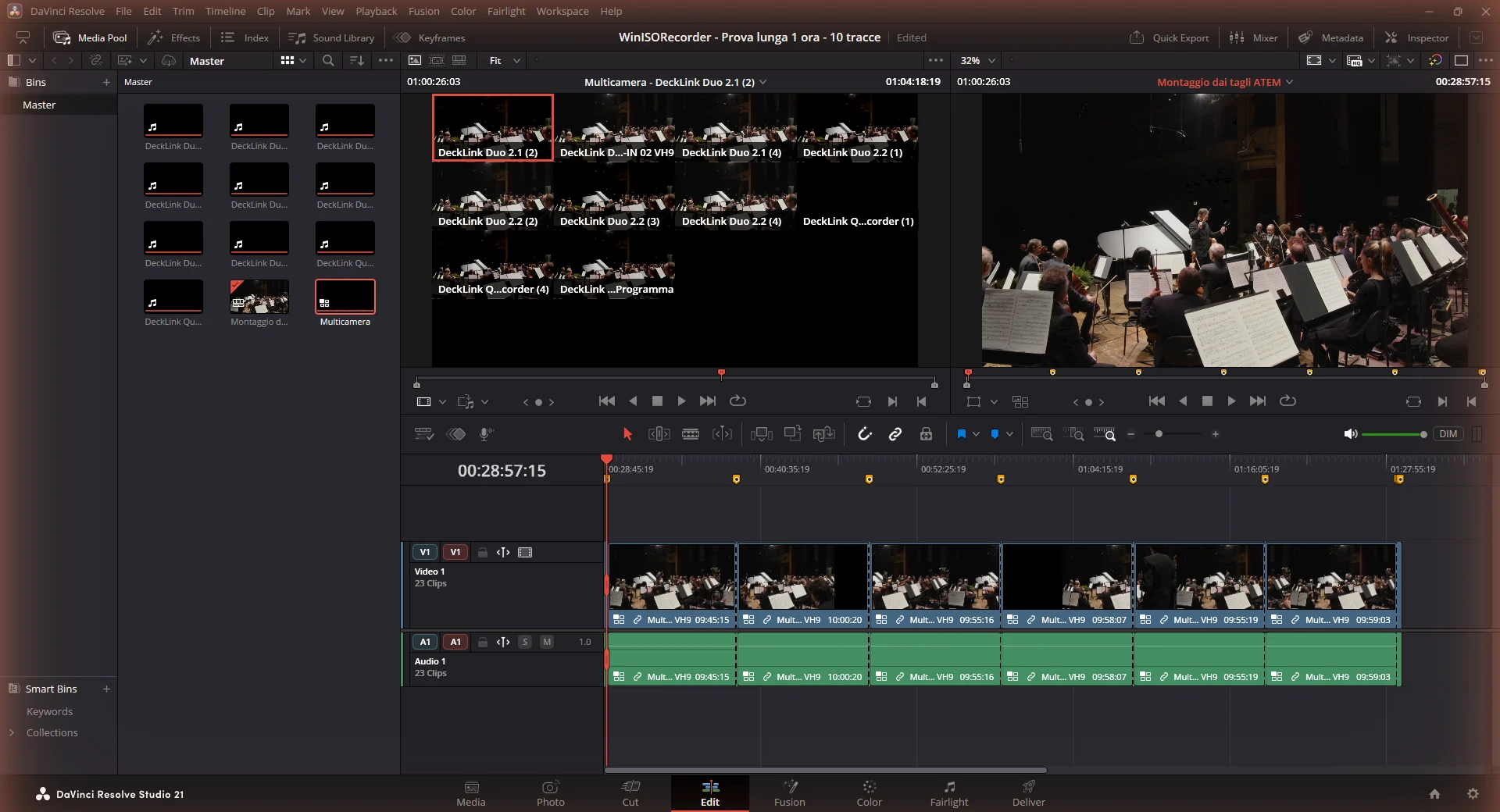
The one-hour test in DaVinci Resolve, with the cuts from the long test.
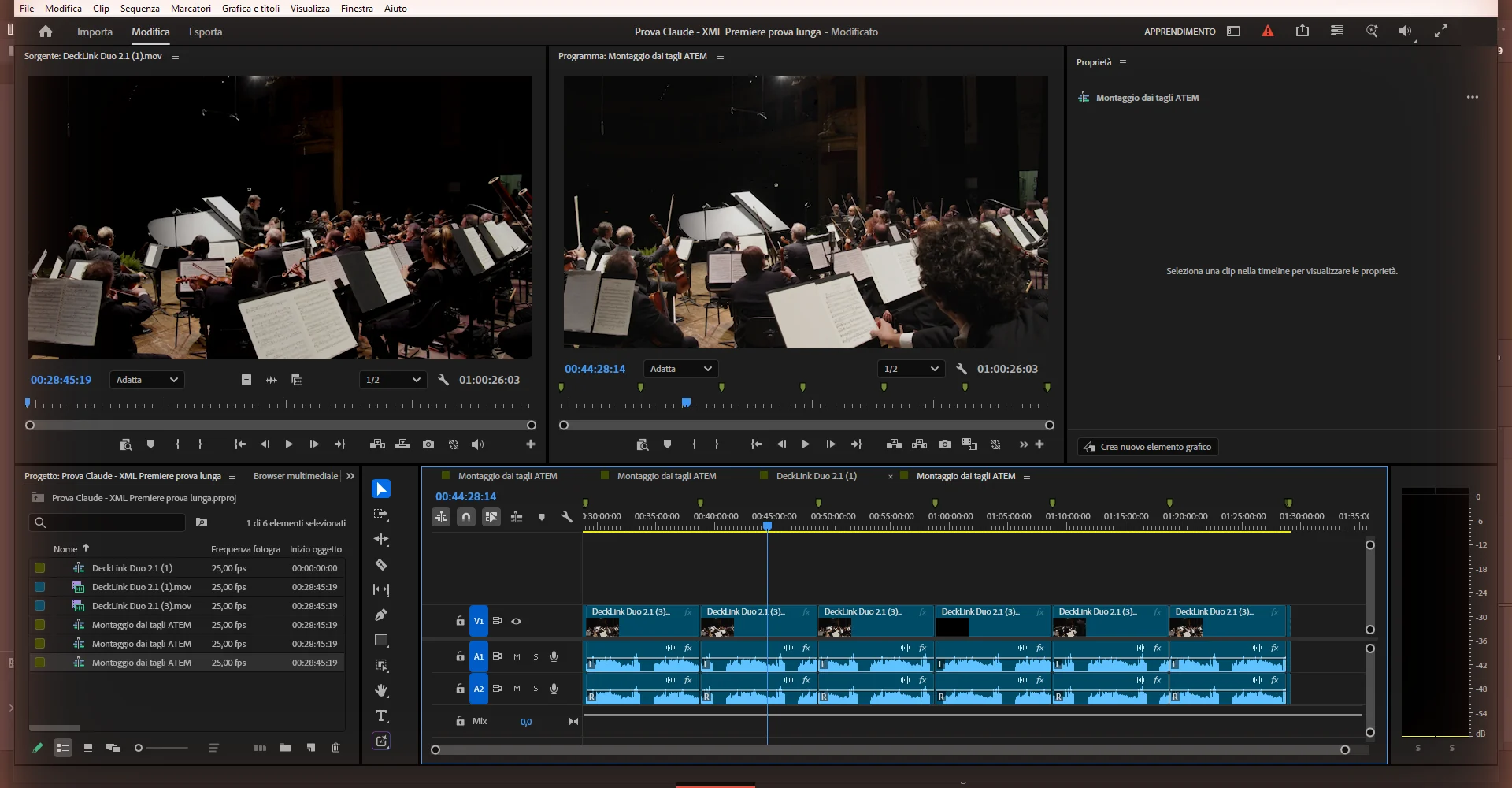
The one-hour test in Premiere Pro: 23 clips, two dissolves and the audio on two tracks.
15 November 2026 — Eight aux outputs and a Blackmagic Micro Converter SDI to HDMI 3G
What I tested. The cables arrived to connect the Blackmagic ATEM 2 M/E Constellation HD’s eight aux outputs to the two Blackmagic DeckLink Duo 2 cards. The program also goes to an HDMI input through the Blackmagic Smart Videohub 12 x 12 and a Blackmagic Micro Converter SDI to HDMI 3G.
How it went. The recorder worked out by itself which output of the Blackmagic ATEM 2 M/E Constellation HD reaches which input, changing one output at a time for a moment. The delay measurement gave zero frames on all nine inputs, including the HDMI one through the Blackmagic Micro Converter SDI to HDMI 3G. Then ten tracks recorded together with ten cuts and three dissolves on the program: 14 out of 14 cuts on the right frame on all nine tracks with signal, 1,296 frames per track, none dropped.
What I fixed.
- The tool that maps the outputs stopped after twenty seconds with no result, because it never received the recorder’s messages. Fixed.
- A file took the source name read a few seconds before REC. Names are now read again from the Blackmagic ATEM 2 M/E Constellation HD at the moment of REC.
7 November 2026 — The edit for Premiere Pro too
What I tested. Next to the Resolve project the recorder now writes an XML and an EDL for Adobe Premiere Pro, with the cuts and dissolves of the live show. I opened them in Premiere Pro 2026 on test recordings.
How it went. Start timecode and dissolves in the right place. With the EDL, eight clips out of eight on the exact timecode.
What I fixed.
- The files stayed offline because of how their paths were written in the XML. Fixed.
- Premiere does not read fragmented MOV files, the format that loses nothing if the computer goes down. The recorder now closes every file as a regular MOV, and the repair after an interruption rewrites it the same way.
- The EDL has to be imported choosing PAL and a 25 fps sequence: Premiere suggests NTSC, and then everything drifts. This will go in the instructions.
31 October 2026 — First test with the control room live
What I tested. The recorder with its own page, connected to the control room for the first time with a single cable: the Blackmagic ATEM 2 M/E Constellation HD program over SDI, and the Blackmagic HyperDeck Studio Mini’s HDMI output into an HDMI input. Then series of cuts between bars and black, repeated on different inputs and cards, and a nine-and-a-half-minute recording.
How it went. The Blackmagic ATEM 2 M/E Constellation HD’s timecode ends up in the files, the Blackmagic HyperDeck Studio Mini starts and stops with REC, no frames dropped. In the nine-and-a-half-minute recording, 14,165 frames per input, none dropped and no drift between the two cards.
What I fixed.
- On the HDMI input every cut arrived one frame late: that is the Blackmagic HyperDeck Studio Mini’s latency, as it loops out over HDMI what it receives. This is where the per-input delay comes from, which the recorder measures with one button and corrects in the files.
- On one of the two Blackmagic DeckLink Duo 2 cards all cuts came out shifted by one frame. The card was not the cause: I was timing cuts by the moment the driver delivers the frame, which differs from card to card. They are now timed by the moment the frame arrives on the cable, which follows the Blackmagic ATEM 2 M/E Constellation HD’s clock and is the same for every card: 96 out of 96 cuts exact.
- DaVinci Resolve crashed when a recorder file was dragged in: it could not decode the audio inside fragmented MOV files. The file now becomes a regular MOV when it is closed, and Resolve reads it without errors.
31 October 2026 — Markers, previews and repair
What I tested. Markers from the keyboard and the network, per-track previews, and repairing the files after a hard shutdown.
How it went. Five markers out of five on the right frame in Resolve, with their colours. Ten tracks killed after 21 seconds and reopened: repaired by themselves, all on the same timecode, half a second lost at the end.
What I fixed. A marker took the source timecode, and when the source jumps, like a Blackmagic HyperDeck restarting a clip, it landed in the wrong place. It now counts from the files’ timecode.
30 October 2026 — The first code
What I tested. The recorder core in C++, without an interface: ten DNxHD tracks for ten minutes with concert footage, the Blackmagic ATEM 2 M/E Constellation HD cut log, audio, and a signal pulled halfway.
How it went. 14,998 frames per track, none dropped. The first Resolve project with real cuts: 14 out of 14 on the right frame, in the recorder’s file and in the Blackmagic HyperDeck Studio Mini’s. Audio 0.65 milliseconds from the original clip. Signal pulled for eight seconds: black with estimated timecode, and when it came back the real timecode resumed exactly.
What I fixed.
- Files ended with lengths one or two frames apart. The end, like the start, is now common to all tracks.
- All cuts landed one frame early, because in the packet that announces a cut the Blackmagic ATEM 2 M/E Constellation HD sends a timecode that is already one frame ahead. Fixed in the calculation.
- The first encoding library was three and a half times slower than it should be. With a different build of the same version CPU load dropped from 44-50% to 19-21% on ten tracks.
30 October 2026 — The Blackmagic ATEM 2 M/E Constellation HD’s timecode and cuts
What I tested. Before writing the program, with a test bench: which timecode the Blackmagic ATEM 2 M/E Constellation HD sends over SDI, and when cuts arrive, on the network and in the picture. Then an hour of continuous reading.
How it went. The Blackmagic ATEM 2 M/E Constellation HD sends RP188 timecode and the Blackmagic Smart Videohub 12 x 12 passes it through. The new picture arrives two frames after the cut is announced on the network, every time. In one hour, 89,996 frames without losing one and more than twenty thousand network messages without an error. The Blackmagic HyperDeck Studio Mini file recorded over the same hour had all twenty cuts on the same frame.
16 October 2026 — Timecode in the cable
What I tested. A Blackmagic DeckLink Mini Monitor HD generating pictures with the frame number drawn into them and timecode in the signal, and a Blackmagic DeckLink Duo 2 reading it.
How it went. 7,515 frames out of 7,515 with the timecode matching the drawn number. The Blackmagic DeckLink Duo 2 reads every type of RP188 timecode.
What I learned. If the receiving program falls behind, the driver can hand over the picture of the next frame with the right timecode, and nothing flags it. That is why the recorder copies and returns every frame within a couple of milliseconds and watches that time as an alarm.
Still to test
- 4K with a real 4K Blackmagic ATEM: picture, RP188 timecode over 12G-SDI and cuts;
- a cable pulled mid-recording and plugged back in;
- the project in the free version of DaVinci Resolve;
- installation on a second computer, with different cards, and then on the beta testers’ machines;
- the Blackmagic Micro Converter BiDirectional SDI/HDMI 3G instead of the Blackmagic Micro Converter SDI to HDMI 3G;
- dissolves towards an external input of the Blackmagic ATEM 2 M/E Constellation HD, which in the 16 November test started five frames late;
- the voice of a vMix Call alone on its own track, sending that input’s audio to the aux output instead of the program;
- more than twelve real inputs recorded at once, instead of copies of a single one;
- the input map on a control room other than mine;
- with the English version, the delay measurement and the repair after an interruption.